

How to set up Cron Jobs for Maintaining Your Linux System
A cron job in Linux is an automatic scheduled task. Say for instance you want to run a system maintenance operation that would remove unwanted files. You might not want to do this when you are actually using the system for it would intervene with your (more important) work. Instead of spending your working time on a job like this, you can utilize some idle time and instruct your Linux system to perform this task on behalf of you.
Cron job instructions are saved in cron tables, also known as crontab. Crontab is located in /var/spool/cron/crontab. To edit the cron tables you can use a text editor in Linux like VI.
How Do I Configure a Cron Job?
Cron jobs in Linux are of two flavors.
- System cron jobs
These will be system critical tasks that usually require to be run as the root.
- User cron jobs
Other users can set up their own scheduled tasks, which can only be run at user privilege level.
Step 1
First task is to list out the items in the crontab file. Note that when you add a new crontab item all existing items will be removed. Therefore it is recommended to first copy the list to another location and add items to the copy you created. This is the Linux command.
# crontab -l -u student >/tmp/crontab.student
I am assuming that I, as the root user assigning a crontab job to the user named student. -l option lists out elements in the crontab file. -u specifies the user. The crontab elements are copied to a file called crontab.student under /tmp/ directory.
Step 2
Add the new crontab line to the end of the file /tmp/crontab.student. A crontab element, regardless the function has 6 fields.
- Minute (0-59)
- Hours (0-23)
- Day (1-31)
- Month (1-12) – [1 for January – 12 for December]
- Day of the week(0-6) - [0 for Sunday – 6 for Saturday]
- /path/to/command – path to the command to be executed (e.g /usr/bin/find )
Example: 0Â Â Â 2Â Â 12Â Â *Â Â Â 0,6Â Â /usr/bin/find
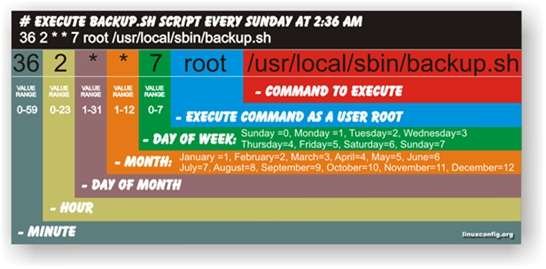
This command executes the ‘find’ operation at 2.00 AM on the 12th of every month, which should be either Saturday or Sunday.
Note that you can enter (*) symbol to state that any value is acceptable for that particular field. Specific numbers are entered to restrict that ‘openness’ and to ensure that the job is performed exactly on that time. A range of values can be given with a (-) e.g. 1-5 in day field says that the job should be run from Monday through Friday. To specify intervals you can use (/) a slash character. As an example, */10 in the minute field means that the cron must run at intervals of 10 minutes.
There exist annotations which can be used to simplify your crontab entry.
- @reboot – Run at startup only.
- @yearly or @annually – Run once a year, equivalent to “0 0 1 1 *”.
- @monthly – Run once a month, equivalent to “0 0 1 * *”.
- @weekly – Run once a week, equivalent to “0 0 * * 0”.
- @daily or @midnight– Run once a day, equivalent to “0 0 * * *”.
- @hourly – Run once an hour, equivalent to “0 * * * *”.
e.g @hourly /usr/local/bin/grep
- This means that the command grep located at /usr/local/bin/ must be executed every hour.
Step 3
After adding the entry crontab file must be saved and closed.
- Place system crontab entries in file /etc/crontab.
- Place user specific crontab entries in file /var/spool/cron.
Step 4
Backing up of crontab file can be done with following commands.
- # crontab -l > /backup/cron/users.root.bakup
This creates a copy of crontab files at /backup/cron/ under the file name users.root.backup.
You may add -u <username> option to backup crontab files for a specific user.
You might want to know about
# crontab -e -u student
wich starts the system editor and edits the crontab file with it.
it’s easyer that recreating the file over and over again.
you can use the editor of your liking by modifying $EDITOR like
# declare -x EDITOR=”/usr/bin/nano”
The steps presented here for editing a Linux crontab file do not follow the recommended practice and should be avoided. According to the man pages for many distributions of Linux, crontab(1) should be used for making any changes to crontab files. For example, this is for ISC Cron:
(from http://linux.die.net/man/1/crontab):
Crontab is the program used to install, deinstall or list the tables used to drive the cron(8) daemon in ISC Cron. Each user can have their own crontab, and though these are files in /var/spool/ , ***[they are not intended to be edited directly]***.
(emphasis mine)
(and this is from http://manpages.ubuntu.com/manpages/maverick/man1/crontab.1.html):
crontab is the program used to install, deinstall or list the tables
used to drive the cron(8) daemon in Vixie Cron. Each user can have
their own crontab, and though these are files in
/var/spool/cron/crontabs, they are not intended to be edited directly.
In other words, placing crontab files in the directories where they usually live, as suggested in this article, is not recommended. It may not even work on certain distributions of Linux, as can be seen by the different directories listed in the two man page excerpts above. Instead, use the crontab command itself to install the new crontab file, as stated in the man pages.
But the simpler way, also recommended in the crontab man pages, is to use the -e option to the crontab command:
(from https://help.ubuntu.com/community/CronHowto):
To use cron, simply add entries to your crontab file. To do this, open a terminal window and enter crontab -e. An editor will open displaying your current crontab file. Edit the crontab using the format described below. Then save your changes and your new crontab will be installed. Exiting without saving will leave your crontab untouched.
-F.M.